File locations & installation instructions
I apologize for gearing this towards Windows users, but that's the OS I'm on, and hopefully your setup on other systems is easy to deduce from these instructions.
Without further ado, here are the default locations for scripts, presets, and patches:
- Patcher instruments / generators = C:\Users\YOU\Documents\Image-Line\FL Studio\Presets\Plugin presets\Generators
- Patcher FX = C:\Users\YOU\Documents\Image-Line\FL Studio\Presets\Plugin presets\Effects\Patcher
- VFX Script = C:\Program Files\Image-Line\FL Studio 2025\Data\Patches\Plugin presets\Effects\VFX Script
- Formula Controller = C:\Users\YOU\Documents\Image-Line\FL Studio\Presets\Plugin presets\Effects\Fruity Formula Controller
- Piano roll scripts = C:\Users\YOU\Documents\Image-Line\FL Studio\Settings\Piano roll scripts
Piano roll scrips actually have a shortcut menu, if you check out this section on the piano roll:
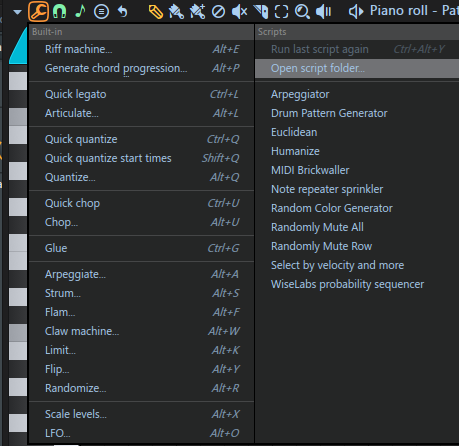
This allows you to easily open the script folder and drop in .pyscript files.
Hope this helps, and I hope you dig the scripts and patches! Also, let me know if you'd like to see some more scripting and patching tutorial videos in the future, because I'd be into doing something like that if there's any demand for it :).
Leave a comment
Log in with itch.io to leave a comment.